green_customer_server
- 고객관리 서버
api 서버
node.js
express
- 데이터베이스 AWS
npm init// enter enter ~~
npm install expressnpm install corsnpm install mysql
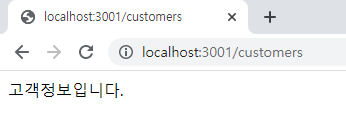
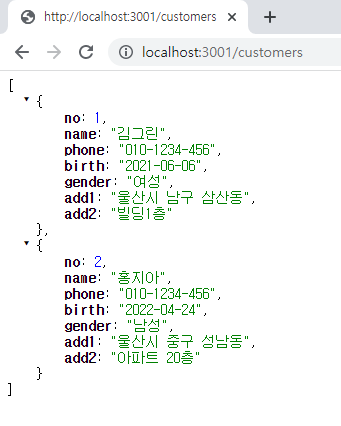
index.js
const express = require("express");
const cors = require("cors");
const app = express();
const port = 3001;
const mysql = require("mysql");
const fs = require("fs")
const dbinfo = fs.readFileSync('./database.json');
// 받아온 json 데이터를 객체형태로 변경 JSON.parse
const conf = JSON.parse(dbinfo)

// connection mysql연결 createConnection()
// connection.connect() 연결하기
// connection.end()연결종료
// connection.query('쿼리문', callback함수)
// callback(error, result, result의 field정보)


const connection = mysql.createConnection({
    host: conf.host,
    user: conf.user,
    password: conf.password,
    port: conf.port,
    database:  conf.database
})
app.use(express.json());
app.use(cors());

// app.get("경로", 함수)
// connection.query("쿼리문", 함수)
app.get('/customers', async (req, res)=> {
    // connection.connect();
    connection.query(
        "select * from customers_table",
        (err, rows, fields)=> {
            // res.send("고객정보입니다.")
            res.send(rows)
            console.log(fields);
        }
    )
    // connection.end();
})

app.get('/detailview/:no', async (req, res)=> {
    const params = req.params;
    // const { no } = params;
    connection.query(
    `select * from customers_table where no=${params.no}`,
        (err, rows, fields)=> {
            res.send(rows[0])
        }
    )
})

// 내가한 것
// // addCustomer post 요청이 오면 처리
// app.post("/addCustomer", (req, res)=>{
//     const body = req.body;
//     const { c_name, c_phone, c_birth, c_gender, c_add, c_adddetail} = body;
//     if(!c_name || !c_phone || !c_birth || !c_gender || !c_add || !c_adddetail) {
//         res.send("모든 필드를 입력해주세요");
//     } else {
//         connection.query(
//             `insert into customers_table (name, phone, birth, gender, add1, add2) values ('${c_name}', '${c_phone}', '${c_birth}', '${c_gender}', '${c_add}', '${c_adddetail}')`,
//             (err, rows,fields) => {
//                 res.send("등록되셨습니다.")
//             }
//         )

//     }
// })


// addCustomer post 요청이 오면 처리 req => 요청하는 객체, res => 응답하는 객체
// mysql 쿼리 select / update / delete / insert
// insert into 테이블(컬럼1, 컬럼2, 컬럼3, ...) values(?, ?, ?)
// query("쿼리", [값1, 값2, 값3, 값4, 값5, 값6], 함수)
// insert into customers_table(name, phone, birth, gender, add1, add2)
// values(?, ?, ?, ?, ?, ?)
app.post("/addCustomer", async (req, res)=>{
    console.log(req)
    // const body = req.body;
    const { c_name, c_phone, c_birth, c_gender, c_add, c_adddetail} = req.body;
    connection.query(
        // `insert into customers_table (name, phone, birth, gender, add1, add2) values ('${c_name}', '${c_phone}', '${c_birth}', '${c_gender}', '${c_add}', '${c_adddetail}')`,
        "insert into customers_table(name, phone, birth, gender, add1, add2) values(?, ?, ?, ?, ?, ?)",
        [c_name, c_phone, c_birth, c_gender, c_add, c_adddetail],
        (err, rows,fields) => {
            res.send("등록되셨습니다.")
        }
    )
})

// 삭제요청 쳐리 /detailview/${no}
// delete from 테이블명 조건명
// delete from customers_table where no = no
app.delete('/detailview/:no', async (req, res)=> {
    const params = req.params;
    console.log('삭제');
    connection.query(
    `delete from customers_table where no=${params.no}`,
        (err, rows, fields)=> {
            res.send(rows)
        }
    )
})

// 수정요청
// update 테이블이름 set 컬럼명 = 값 where no = 값
// update customers_table set name='', phone='', birth='', gender='', add1='', add2='' where no=
// http://localhost:3001/edit/1
app.put('/edit/:no', async (req, res)=> {
    // 파라미터 값을 가지고 있는 객체
    const params = req.params;
    const { c_name, c_phone, c_birth, c_gender, c_add, c_adddetail} = req.body;
    console.log('수정');
    console.log(req.body);
    connection.query(
    `update customers_table set name='${c_name}', phone='${c_phone}', birth='${c_birth}', gender='${c_gender}', add1='${c_add}', add2='${c_adddetail}' where no=${params.no}`,
        (err, rows, fields)=> {
            res.send(rows)
        }
    )
})

// 서버실행
app.listen(port, () => {
    console.log("고객 서버가 돌아가고 있습니다.")
})
database.json
{
    "host": "customer-data.cg4dbcpn4gmm.us-west-1.rds.amazonaws.com",
    "user":"admin",
    "password":"gmlwoqkqh",
    "port":"3306",
    "database": "customers"
}
'Stack > React' 카테고리의 다른 글
| [React] HTML / 자바스크립트로 Redux 맛보기 (0) | 2022.07.11 |
|---|---|
| [React] git clone 한 뒤, 오류 없이 npm start 하는 방법 (0) | 2022.07.09 |
| [React] 고객관리 사이트 구현 (Client) (0) | 2022.07.07 |
| [React] useMemo / useCallback (0) | 2022.07.05 |
| [React] Lamp 쇼핑몰 구현하기 8 (깃허브 주소 및 최종 코드) (0) | 2022.07.05 |